Alarms
Alarms your team can act on
What raises an alarm on a TrackBeat machine, what your team sees, and how they close it. Everything on this page is what the platform does today.
Severity
Four levels, from ISO 20816
Vibration velocity is graded against ISO 20816. A machine that leaves zone A opens an alarm. The alarm follows the zone up and down, and closes when the machine is back in zone A. A persistence check stops a single reading from flapping it.
- AGood
- BSatisfactory
- CUnsatisfactory
- DUnacceptable
In the alarm list, zone B shows as Advisory, zone C as Warning and zone D as Alarm.
Two kinds
How bad, and how different
- Severity alarm
How bad the vibration is, against the ISO 20816 zones for the machine’s class.
- Anomaly alarm
How different the machine is from its own learned baseline. It needs several readings in a row, on a rising trend, before it alarms.
Why a machine can alarm while still inside its ISO zone: a strong departure from its own baseline raises the alarm a level above what the ISO zone alone would give.
Idle machines
No severity alarms from a stopped machine
The platform knows when a machine is stopped, from its shaft speed and vibration, and holds severity alarms while it is. An idle machine does not raise one.
What your team sees
Each alarm says where, how bad, and what next
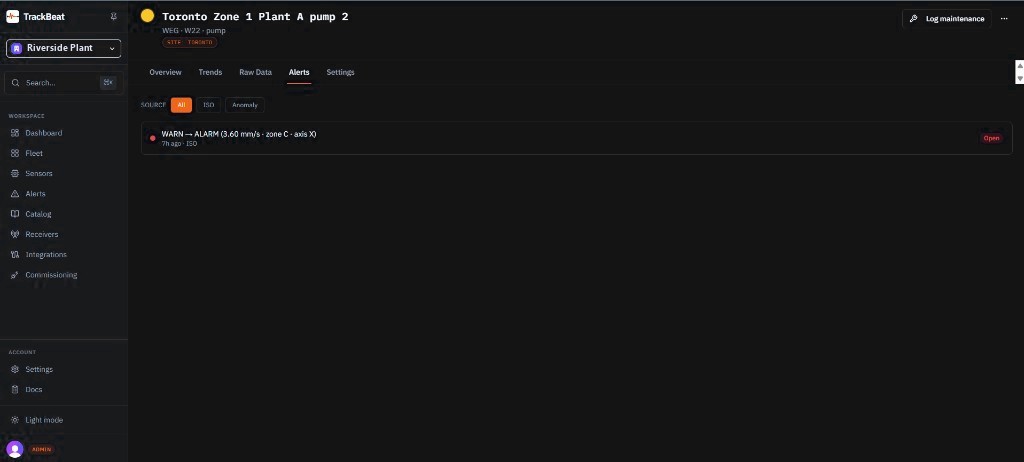
- The machine
Its name, site and catalogue entry.
- How bad
Warning or Alarm, with the ISO zone and the velocity.
- Which kind
A severity alarm or an anomaly alarm, and when it opened.
- What next
A recommended next step for the level.
Where it shows
In the TrackBeat app
Alarms arrive in the Alarms list in the TrackBeat app, which refreshes on its own and tells you when new ones arrive.
Close the loop
Acknowledge, act, and keep the record
- Acknowledge
Acknowledge with a note, assign an owner, and discuss it in a comment thread on the alarm.
- Log the work
Record the work done against the alarm: inspection, lubrication, replacement or repair. Close it with a note.
- History and export
Open and acknowledged alarms stay on record, filtered by status and time, and export to CSV.